Thunderbird is an Email Client Software, and you can work with it in the following way.
1. Open Mozilla Thunderbird.
2. In the left panel, you can see a list of your email accounts. Double Click on Inbox or if it is hidden, click on your email, and it will expand and show the inbox, the trash list. Etc. 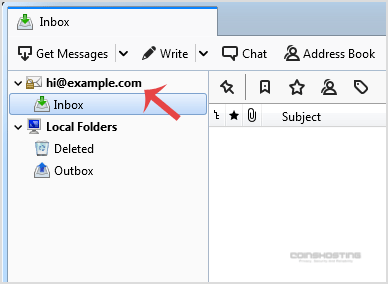
Another option is to right-click on the email and click on "Get Messages".
Thunderbird also automatically checks email every 5 to 10 minutes. It also automatically checks mail when you open the program.
- Home
-
Store
- Browse All
- Managed cPanel Hosting
- VPS - KVM Linux Server
- VPS - KVM Linux RDP Server
- VPS - KVM Windows RDP Server
- Dedicated Servers (USA)
- Dedicated Servers (Netherlands)
- Dedicated Servers (Switzerland)
- SSL Certificates
- Linux LXC VPS Containers
- Linux KVM VPS – SolusVM
- Register a New Domain
- Transfer Domains to Us
- Announcements
- Knowledgebase
- Network Status
- Affiliates
- Contact Us
-
More